





Mastering Google Postmaster Tools: A Marketer’s Guide to Understanding Reputation, Spam Rates & Deliverability Signals
Email marketers and CRM teams know that strong Gmail deliverability is essential for revenue, retention, and customer engagement. But diagnosing inbox placement issues, or proving the impact of improvements, can feel like guesswork without the right data.
That’s where Google Postmaster Tools comes in. Google has introduced Postmaster Tool V2, and the legacy Version 1 has now been retired. The new V2 tool provides deeper visibility into compliance with Gmail’s sender requirements.
Postmaster Tools is Google’s official portal for analyzing how Gmail evaluates your domain and your email program. It offers visibility into whether Gmail trusts your messages, why emails may be delivered to spam, and how your authentication setup and sending patterns contribute to your performance.
While your team may use Postmaster Tools behind the scenes, this blog breaks down everything marketers should understand about the platform, including how to interpret its metrics and what actions can improve domain health over time.
Why Google Postmaster Tools Matters
Gmail processes more email than any other mailbox provider, and its filtering systems are sophisticated, engagement-driven, and compliance-based. If your performance dips, you may experience:
- More messages landing in spam
- Lower open rates
- Slowed or throttled message delivery
- Increased bounce errors
Postmaster Tools helps you catch these issues before they snowball and gives you the visibility you need to take corrective action.
Key Metrics Marketers Should Monitor in Google Postmaster Tools
Google Postmaster Tools provides several dashboards. Below is a breakdown of the most important ones and what each metric means:
| Dashboard | Description |
|---|---|
| Compliance status | The Compliance status dashboard displays your compliance with the email sender requirements described in our Email sender guidelines. |
| Spam rate | The Spam Rate dashboard displays the percent of your messages that recipients manually mark as spam in Gmail. |
| Feedback loop | The Feedback Loop dashboard displays email campaign messages that recipients have marked as spam. |
| Authentication | The Authentication dashboard shows the percent of your email that passes SPF, DKIM, and DMARC authentication. |
| Encryption | The Encryption dashboard shows the percent of your email that’s sent over an encrypted SSL or TLS connection. |
| Delivery errors | The Delivery Errors dashboard displays the percent of all authenticated messages (SPF or DKIM) that were rejected or that temporarily failed, compared to all authenticated messages. |
1. Compliance Status
This dashboard tracks domain compliance with Google’s email sender requirements. Issues usually indicate setup or sending errors needing attention.
There are 3 possible states for each requirement in the dashboard:
- Compliant: Your email system is correctly set up to meet the requirement. No action is needed.
- Needs work: You must update your email system to meet the requirements. The status column describes what actions to take to meet the requirement.
- No data found: Evaluated using emails matching specific filters, provided enough email volume exists.
Compliance Status Metrics For All Bulk Senders:
| Parameter | What Google Checks | Good / Meets Requirement | Warning / Needs Attention | Critical / Failing |
|---|---|---|---|---|
| SPF & DKIM Authentication | Verifies email authenticity via SPF and DKIM protocols. | SPF and DKIM are fully configured and successfully validated by Gmail. | Authentication is inconsistent, or certain sending sources lack proper alignment. | SPF/DKIM is completely missing or failing for applicable mail. |
| From: Header Alignment | Verifies the visible From: header domain aligns with SPF or DKIM domains. | The From: domain perfectly aligns with SPF/DKIM and satisfies DMARC alignment. | Some sending streams or mail flows are not correctly aligned. | The From: domain fails to align with either SPF or DKIM. |
| DMARC Authentication | Confirms if a DMARC policy is published for the sending domain. | DMARC is published and configured (minimum policy of p=none for bulk senders). | DMARC is published but the policy configuration or alignment needs review. | DMARC is missing entirely or fails to meet Gmail’s sender requirements. |
| Encryption | Checks if messages are securely transmitted to Gmail using TLS. | All mail is consistently transmitted using secure TLS encryption. | Encryption is intermittent; some email traffic is sent unencrypted. | Mail is transmitted without the required TLS protection. |
| User-Reported Spam Rate | Measures the percentage of Gmail users who manually mark messages as spam. | Under 0.10% (the ideal recommended operating level). | 0.10% to 0.29% (warning zone; requires prompt attention). | 0.30% or higher (exceeds Gmail’s compliance threshold; risk of blocking). |
| DNS Records | Checks that sending IPs have valid forward and reverse DNS (PTR) records. | PTR and forward DNS records are correctly configured and resolve consistently. | DNS setup is incomplete or inconsistent across some sending IPs. | Required forward/reverse DNS or PTR records are missing or incorrect. |
| One-Click Unsubscribe | Verifies bulk marketing and promotional mail support one-click unsubscribe. | RFC 8058 one-click unsubscribe is correctly implemented in the email headers. | Unsubscribe implementation is incomplete or missing from some marketing streams. | One-click unsubscribe is completely missing from bulk promotional emails. |
| Honor Unsubscribe | Monitors whether unsubscribe requests are processed in a timely manner. | Unsubscribe requests are successfully honored and processed within 48 hours. | Processing is delayed or inconsistent across different systems. | Users continue to receive promotional emails after unsubscribing. |
Deliverability Analysis
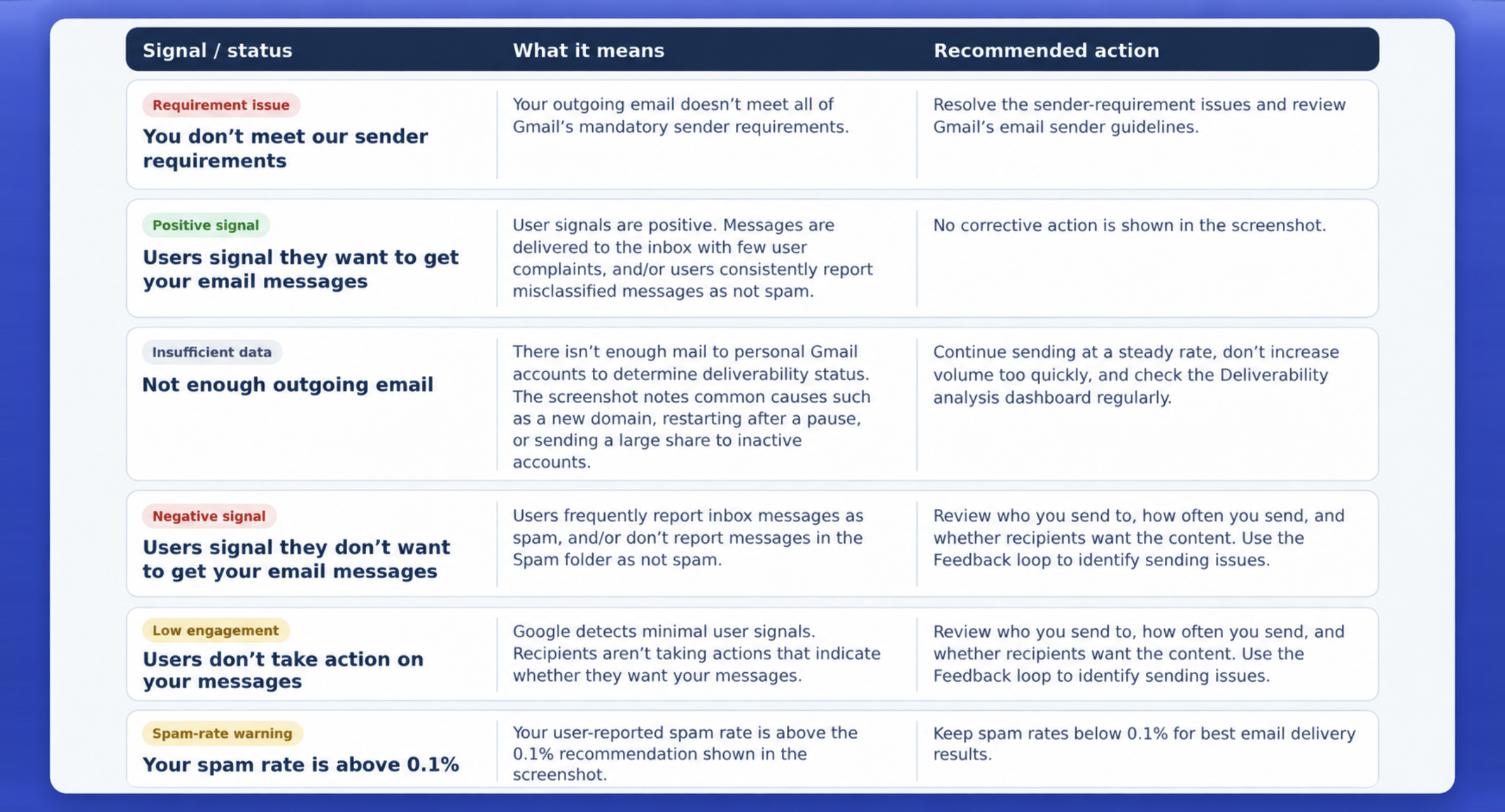
The “Deliverability analysis” diagnostic tool under the “Compliance status” dashboard helps users analyze and enhance their Gmail deliverability by offering domain recommendations.
Below are some analysis messages you might see for your domain:
- Not enough outgoing emails
- You don’t meet our sender requirements
- Users signal that they want to get your email messages
- Users signal that they don’t want to get your email messages
- Users don’t take actions on your messages
- You exceeded the recommended spam threshold
2. Spam Rate: User-reported Spam Complaints
Your spam rate is one of the most important signals in Postmaster Tools. It represents the percentage of Gmail users who mark your emails as spam.
- Healthy: below 0.1%
- Warning Zone: 0.10% – 0.30% (risk of filtering or slower delivery)
- Risk Zone: above 0.3% (high chance of spam placement)
What causes spam rate spikes?
Common root causes include:
- Low engagement (recipients stop opening your emails)
- Broad, untargeted messaging
- Old or unengaged lists
- Purchased lists or contacts who didn’t explicitly opt in
When spam rates rise, performance almost always follows.
3. Feedback Loop
This dashboard assists in pin-pointing campaign emails that recipients tagged as spam, offering clear insights to help refine message content, audience targeting, list quality, and overall delivery strategy.
Key metrics provided by this dashboard:
- Average FBL spam rate: Tracks the daily mean spam rate across all campaigns flagged via Feedback Loop over time.
- Identifier volume: Monitors the daily count of distinct campaign identifiers captured by Feedback Loop.
4. Authentication: SPF, DKIM & DMARC Alignment
Postmaster Tools tracks whether messages sent from your domain pass Google’s authentication checks. Reaching a 100% authentication rate plays a vital role in building domain trust and preserving sender health. Drops indicate configuration issues or DNS problems.
Authentication failures directly impact:
- Inbox placement
- How Gmail evaluates overall sender health
- Your vulnerability to spoofing or phishing
5. Delivery Errors: Why Messages Bounce or Fail
The Delivery Errors dashboard identifies the reasons Gmail temporarily rejects or blocks mail. Below are definitions for each error type, including:
- Rate Limit Exceeded: Gmail is throttling traffic due to high send volume or suspicious patterns.
- Suspected Spam: Gmail believes the content or behavior resembles spam.
- Content Spammy: Content specifically raises red flags.
- Bad Attachment: Unsupported or unsafe attachment types.
- Bad DMARC Policy: Your domain is enforcing a reject policy that conflicts with Gmail’s checks.
- RBL Listings: Your domain or IP is on a public blocklist.
- Missing PTR Record: The sending IP lacks a proper reverse DNS record.
This is one of the most valuable features for diagnosing deliverability issues quickly.
How to Interpret Data Timing and Delays
Postmaster Tools data is updated daily and typically reflects signals from the last 24–48 hours. This is important because many teams assume real-time reporting. Gmail intentionally delays updates for accuracy and fraud-prevention.
Best Practices for Maintaining Strong Gmail Deliverability
There are several practices essential for staying in Gmail’s good graces. Here are the most important ones:
-
- Maintain consistent sending volume: Avoid erratic spikes or drops in send volume. Gmail flags sudden changes as suspicious.
- Keep complaint rates low: Aim to stay comfortably under 0.1%. This often requires ongoing segmentation, sunset policies, and relevant content strategies.
- Fully authenticate your email: SPF, DKIM, and DMARC must be correctly configured and aligned for all mail streams.
- Build and maintain strong engagement: Suppression of unengaged recipients is key. Gmail uses engagement heavily in filtering.
- Seek expert help when metrics shift: Catching issues early prevents long-term damage. Your deliverability team can help interpret trends and determine necessary corrective actions.
What Marketers Should Check Weekly in Postmaster Tools
- Compliance Status: All metrics should “Meet Requirement”
- Deliverability Analysis: Look for the signal message and the recommended action
- Spam rate: Any days above 0.1%?
- Feedback Loop: Identify the campaigns with elevated spam rates
- Authentication: Look for SPF, DKIM, DMARC to be 100%
- Delivery Errors: Look for the reasons Gmail temporarily rejects or blocks mail
Consistent monitoring allows you to detect issues early, before they impact revenue.
Final Thoughts
Google Postmaster Tools is one of the most powerful and underutilized resources in email marketing. It translates Gmail’s filtering logic into actionable data, helping brands understand exactly how their mail is being evaluated.
Pairing these insights with strong list hygiene, authentication, and targeted strategies is the best way to maintain overall performance and ensure your emails reach the inbox, not the spam folder.
If you need help interpreting your Postmaster Tools data or are seeing negative trends, our Deliverability experts are here to help.